Two devices, one protocol
Co-designed a custom serial protocol and built two Windows desktop apps for configuring Vivaldi's commercial audio hardware, replacing a painfully slow on-device setup workflow.
On this page
Seventeen commands. Every packet smaller than a tweet.1 One protocol that served two completely different hardware products with exactly one byte changed.
Context
The Giove PM2 is the kind of device you have heard but never seen. It sits on a hotel reception desk or a conference center lobby: a compact paging microphone station with a numeric keypad, a backlit LCD, and a built-in speaker. An operator dials a zone number, presses Call, and speaks: “Will the real Slim Shady please stand up?”. The amplifier routes the audio to that zone. An Alarm button triggers an all-zone emergency broadcast. Every hotel, every school, every public venue has something like this.
Vivaldi United Group builds these systems, along with amplifiers, controllers, and peripheral devices for multiroom audio and video in commercial installations. The PM2 supports up to 60 individually named zones, four display languages, and configurable audio levels for the microphone, aux-in, and the built-in din-don announcement chime. It connects to the system over a 7-wire cable carrying power, RS485 data, and balanced audio.
All of that configurability lives behind a tiny LCD and four arrow keys.
The Problem
The PM2 has an on-device Setup menu. Long-press Enter. Arrow through four categories. Scroll through parameter values one at a time. Confirm. Navigate to SAVE. Confirm again.
Changing a single audio level: enter Setup, find the right category, find the right parameter, scroll through up to 99 discrete values one by one (no shortcuts, no “type a number”), confirm, navigate to SAVE, confirm. One setting, roughly one minute.
Now picture an installer standing in front of eight PM2 stations in a new hotel. Sixty zones each. Audio levels, display settings, zone names, system config. Every parameter set through that same four-arrow LCD, one value at a time. Half a day gone before lunch, hunched over a screen the size of a calculator. No way to back up a device’s configuration. No way to transfer settings between units. No way to compare two setups. If a device failed, the replacement started from factory defaults and the installer started from scratch.
Vivaldi needed a desktop application that could read and write every configurable parameter over a serial connection. Nothing like this existed for the PM2.
What I Built
vivaldi-pm2-controller: a native Windows 10+ desktop application in C++17 and Qt 6. Plug in a USB-to-serial adapter, click “Read All,” and the entire device state appears on screen in seconds. Six settings panels showing everything at once: audio toggles, gain levels, display options, all 60 zone names, system configuration. Edit what you need, click “Save All,” done. JSON export lets you back up a device, clone its configuration to the next one, or version-control your setups.
The contrast with the old workflow is the whole point. What took an hour per device now takes seconds. What required physical presence at each LCD now works from a laptop plugged into any station on the RS485 bus.
I also built a sibling app for a completely different Vivaldi hardware product, the Cpointer conference room controller, using the same protocol and command infrastructure with zero modifications. More on that later. It is the part of this story I am most proud of.
The software shipped with Italian localization (559 translated strings), a code-signed Windows installer built by a GitHub Actions CI/CD pipeline, and a log panel for real-time protocol debugging during installation. Vivaldi distributed it through their product page. Hundreds of customers, both Vivaldi’s own installers and third-party integrators, used it in the field.
The Protocol
The PM2 talks over a serial cable in raw bytes, six to twenty per command. Pure binary, just hex on a wire. I co-designed this protocol with Vivaldi’s R&D team, iterating from a written specification until the C++ implementation became the ground truth. I had no access to the firmware source code, so debugging meant staring at hex dumps, forming a theory, testing it, and working out whether the mismatch was in the desktop app, the spec, or the firmware.
The physical layer is RS485 at 9600 baud, roughly 960 bytes per second. Slow by any modern standard, but more than enough when your largest packet is 20 bytes. Every command fits in 6 to 20 of those bytes. The structure:
- 2-byte header:
0x56 0x49, ASCII “VI” for Vivaldi. A frame-start marker. - 1-byte version:
0x01. Only one version exists, but the byte makes future evolution possible. - 1-byte length: counts the command byte, payload, and end code.
- 1-byte command: the operation. 9 SET commands (
0x00-0x08), 7 READ commands (0x41-0x47), and a PING (0xFF). READ opcodes are consistently offset by0x40from their SET counterparts. - 0-14 bytes payload: command-specific data.
- 1-byte end code:
0x0D, carriage return.
Responses mirror this structure with one addition: a response code byte (0xFE = success with payload, 0xFF = success without payload, 0x00 = error) and the command byte with bit 7 flipped. Send command 0x42 (READ_DEVICE_ID), get back 0xC2 (0x42 | 0x80). That single bit-flip is the request-response correlation mechanism.
The device echoes the command byte with bit 7 set to 1. This single bit distinguishes every response from its request. Pick a command to see the transformation.
Here is a complete PING exchange, the first thing the app sends after connecting:
Request:  56 49 01 02 FF 0D                          (6 bytes)
        ───── ── ── ── ──
        "VI"  v1 L  PN end

Response: 56 49 01 FE 03 FF 01 0D                    (8 bytes)
        ───── ── ── ── ── ── ──
        "VI"  v1 ok L  PN 01 end
                 │        └── device type: 0x01 = PM2
                 └─────────── VALID_WITH_PAYLOAD
Six bytes out, eight bytes back. The app now knows a PM2 is connected.
PING SPECIAL Check if a PM2 device is connected. The response carries the device type byte.
Audio level encoding
The four gain parameters range from -50 to +10 dB, but the wire format uses unsigned bytes. The solution: add 50 before sending, subtract 50 after receiving. An output level of -10 becomes 0x28 (40 decimal) on the wire. Simple, reversible, no signed-byte ambiguity.
The PM2 protocol encodes audio levels as unsigned bytes. A value of -10 dB becomes 0x28 (40) on the wire: add 50, send the byte. Drag the sliders to see how each level maps to its wire representation and watch the packet update below.
The RESET safety word
The FACTORY_RESET command requires a specific 5-byte ASCII payload: the word "RESET" (0x52 0x45 0x53 0x45 0x54). A stray or malformed packet cannot accidentally wipe a device because the firmware checks for an exact match. The most dangerous operation has a password, and the password is just its own name.
Seventeen commands across two families, and every one fits in a packet smaller than a tweet.2
Architecture
The important design decision was not the packet layout. It was the separation between a device-agnostic serial command layer and the PM2-specific logic above it. That choice let me reuse the same transport and queueing code for a second hardware product later with no changes to the core.
The application is organized in seven layers, from raw serial I/O at the bottom to Qt widgets at the top:
QSerialPort: raw serial read/write (8 data bits, no parity, 1 stop bit, no flow control)SerialCmdQueue: FIFO command queue with timeout managementSerialCmd: individual command wrapping request data, expected response, response mask, parser function, and timeoutPm2Commands: static factory that produces typedSerialCmdinstances for each of the 17 PM2 commandsPm2Device: device abstraction that translates queue completion signals into typed Qt signalsDeviceManager: orchestrator that wiresPm2Deviceto the UI widgets- Qt Widgets: the six user-facing settings panels
Layers 2 and 3, SerialCmdQueue and SerialCmd, know nothing about the PM2. They handle any binary request/response protocol over a serial link. Everything PM2-specific lives in Pm2Commands and above. That boundary is what made the later Cpointer work cheap.
Non-blocking I/O without threads
This was my first real concurrency problem outside university exercises. Serial port communication can block for seconds while waiting for a device response, and a blocked main thread means a frozen UI. The obvious solution is a worker thread. I chose a simpler one.
Qt’s event-loop-based async I/O avoids threads entirely. serial.write() writes to the OS serial buffer and returns immediately. When the device responds, QSerialPort::readyRead fires and triggers the response handler. Completion signals use QMetaObject::invokeMethod with Qt::QueuedConnection, which posts to the event loop instead of calling the slot inline. That prevents re-entrant calls where a completion handler might enqueue another command within the same call stack.
void SerialCmdQueue::processQueue() {
    if (cmdTimeoutTimer.isActive()) return;  // one command at a time
    if (queue.isEmpty()) return;

    auto& front = queue.head();
    serial.write(front.requestData());       // non-blocking write
    cmdTimeRemaining = front.timeout();
    cmdTimeoutTimer.start(CMD_STILL_RUNNING_INTERVAL);
}The cmdTimeoutTimer.isActive() check acts as a mutex-like guard: only one command can be in flight at a time. If the timer is active, processQueue() returns immediately. All communication is serialized without explicit thread synchronization: no mutexes, no condition variables, no data races.
Response masks
For READ commands, the response payload contains device data that the app cannot predict in advance. Hardcoding expected responses would mean writing a separate validator for every command. Instead, the response mask mechanism uses 0x00 wildcards: structural bytes (header, version, response code, command echo) are checked strictly, while payload positions accept any value.
SerialCmd::ResponseComparison SerialCmd::testResponse(
    const QByteArray& response
) const {
    if (expectedResponse.length() > response.length())
        return NOT_ENOUGH_DATA;
    if (expectedResponse.length() < response.length())
        return TOO_MUCH_DATA;

    for (int i = 0; i < response.length(); ++i) {
        quint8 maskByte = expectedResponseMask.at(i);
        if (maskByte != 0x00  // 0x00 = wildcard, accept any value
            && response.at(i) != expectedResponse.at(i)) {
            return MISMATCH;
        }
    }
    return MATCH;
}One generic validation function handles all 17 commands. If the header is wrong, the version is wrong, or the command echo does not match, the response is rejected. Parsing the payload is a separate concern.
Batch commands
Reading all 60 zone names requires 60 sequential request/response exchanges. enqueueMultiple pre-loads all 60 into the FIFO and collects parsed responses into a buffer. When the last one completes, a single multipleCmdsCompleted signal fires with the full vector of results. The UI gets one callback instead of sixty.
The PM2 app serializes all communication through a FIFO queue. Only one command can be in flight at a time, but new commands can be enqueued while the queue is draining. Click multiple scenarios to watch them stack up.
The Desktop Interface
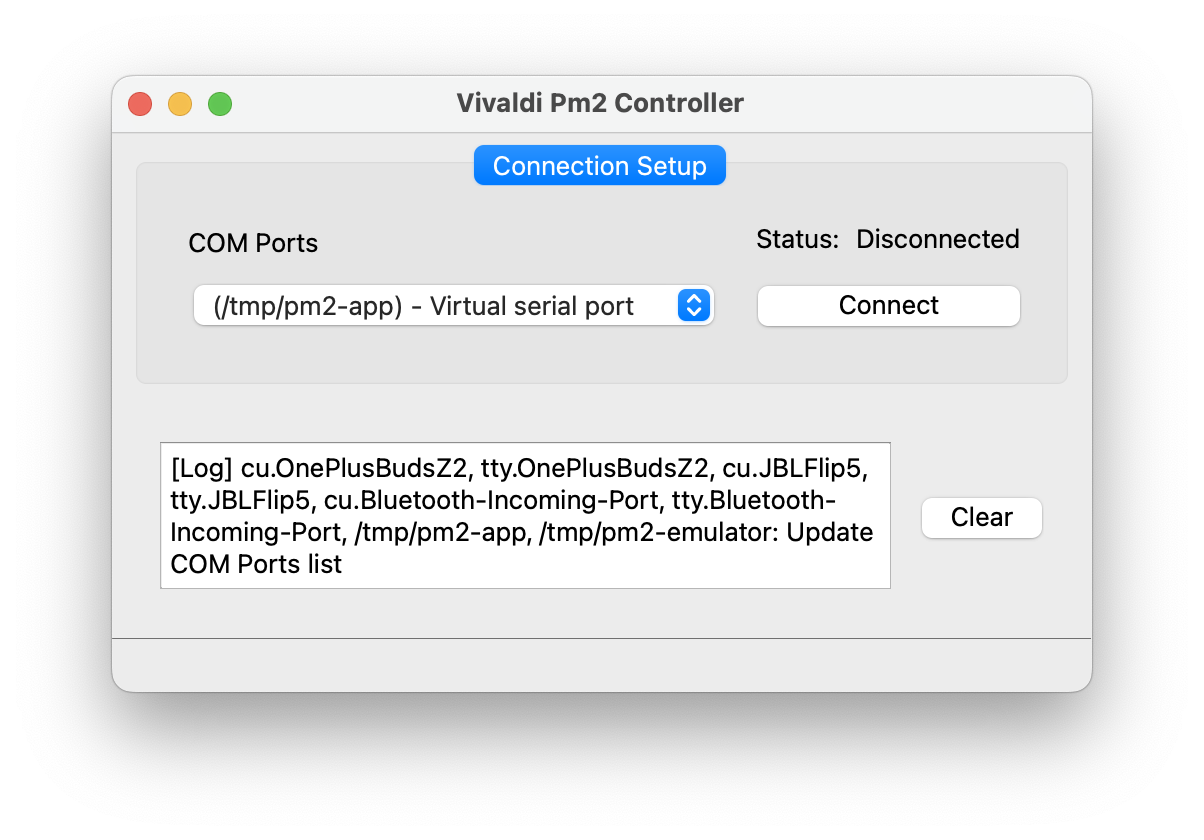
The app uses a two-tab layout. The first tab handles connection: pick a COM port, click Connect, and the app sends a PING. If the device responds with device type 0x01, the second tab unlocks.
During development, I wrote a PM2 device emulator (more on this in the next section), so the desktop UI could be exercised without physical hardware on the desk. The screenshot below shows the connection flow with the emulator’s virtual serial port selected.
The second tab is where the work happens. Six panels arranged so every configurable parameter is visible at once: general control (Read All, Save All, Factory Reset), audio toggles (keyboard buzzer, din-don chime, aux-in, phantom power, internal mic), audio levels with bounded spinboxes ([-50, +10] dB), display settings (screensaver, backlight), a scrollable zone name editor for all 60 zones, and system setup including language, device ID, and a button that syncs the device clock from the PC.
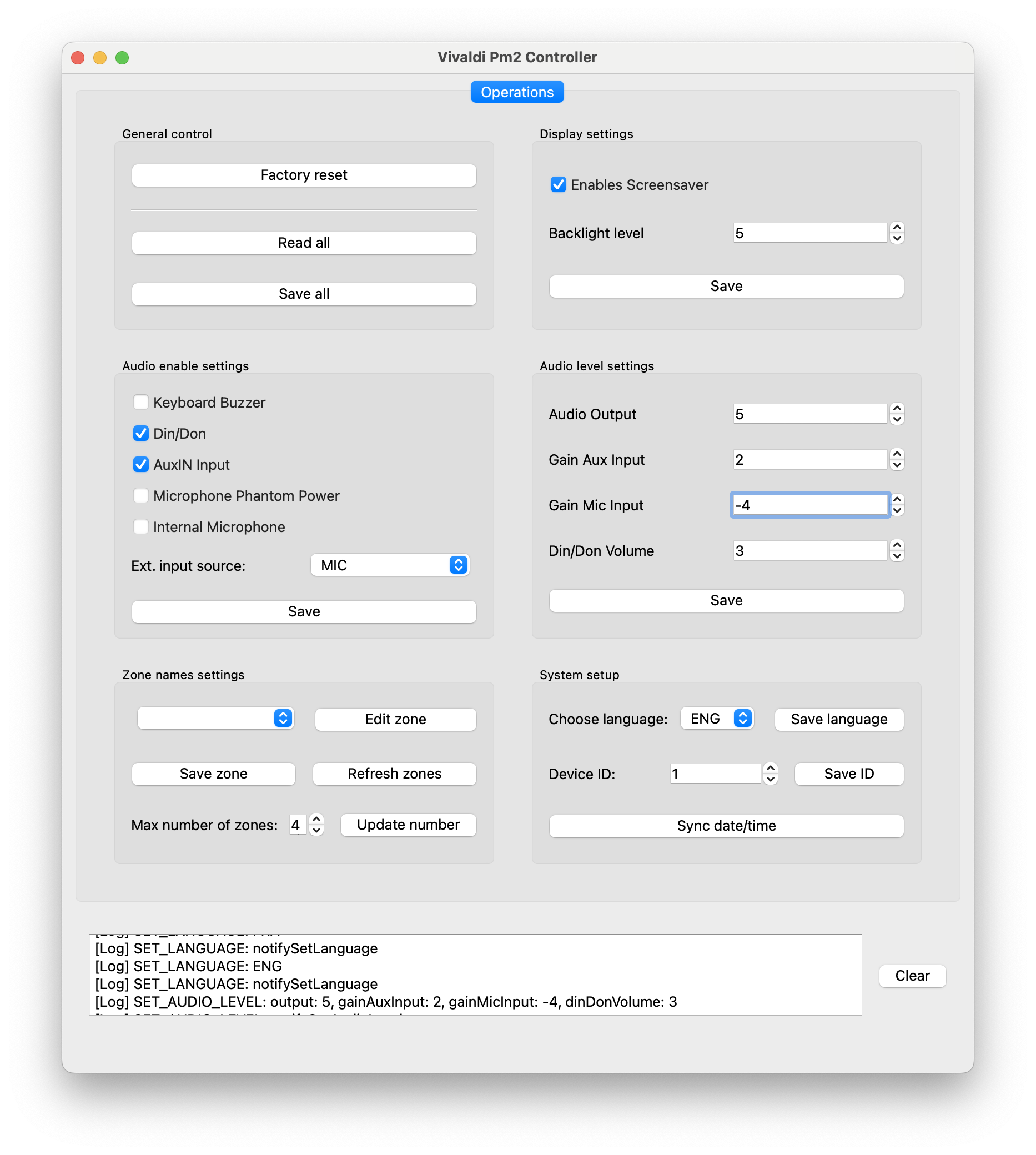
A toggleable log panel (F6) shows raw hex traffic between the app and the device. The menu bar provides JSON import/export, port management, and a help dialog. The installer’s workflow becomes: plug in, Read All, inspect the full device state, change what matters, Save All, unplug, next device. The expensive part of the old process, repeated menu-diving on the device itself, disappears.
The PM2 Emulator
The reusable command layer needed a reliable test surface. The PM2 hardware was not always on my desk, Vivaldi’s R&D team was in a different building, and the firmware was still changing. I needed a way to exercise every code path, including error handling, without a physical device.
I built a serial device emulator: a Node.js application in TypeScript that implements the full PM2 binary protocol. It maintains a stateful device model and responds to every command the desktop app can send. SET commands update the state, READ commands return it, and PING responds with device type 0x01.
On macOS and Linux, the emulator creates a virtual serial port pair using socat:
# Create a linked pair of virtual serial ports
socat -d -d \
  pty,raw,echo=0,link=/tmp/pm2-emulator \
  pty,raw,echo=0,link=/tmp/pm2-app
Two linked PTY endpoints. The emulator opens /tmp/pm2-emulator, and the Qt app connects to /tmp/pm2-app. Data written to one end appears at the other, byte for byte, at memory speed. The raw,echo=0 flags disable terminal line processing so the binary protocol passes through unmodified. On Windows, tools like com0com create real COM port pairs that QSerialPortInfo discovers natively.
The emulator’s core is an async read loop: accumulate incoming bytes, scan for the 0x56 0x49 header, extract complete packets using the length field, dispatch to a handler, write the response. Incomplete packets at buffer boundaries stay in the buffer until the next read completes them.
This emulator was not a convenience. It was the primary testing surface for the command set. Packet construction bugs, parser edge cases, and queue timeout scenarios were usually reproduced here before being verified on hardware.
Haskell as a thinking tool
Before writing a line of C++, I prototyped the protocol in Haskell. It was a scratchpad, never intended for production. Haskell’s pattern matching and algebraic data types made it a natural fit for exploring binary packet construction and response parsing interactively: define a command type, pattern-match on response bytes, run it in GHCi, see the result immediately. The compile-run-test cycle in C++ was too slow for that kind of exploration.
Using a different language as a scratchpad for a C++ project was unusual, but it worked. The Haskell REPL explored the protocol design, the TypeScript emulator validated the production implementation, and the C++ code shipped.
The Cpointer: Same Protocol, Different Product
This is where the earlier abstraction paid off. The Cpointer is a conference room AV controller. Where the PM2 pages hotel lobbies, the Cpointer manages meeting room equipment: it maps microphones to cameras, camera presets, and HDMI matrix inputs. Different industry, different users, different UI.
I built a sibling desktop app, vivaldi-cpointer-controller, using the same wire protocol: same 2-byte “VI” header, same version byte, same packet structure, same | 0x80 response echo, same end code.
PING tells the app which device it is talking to:
PM2 response:      56 49 01 FE 03 FF 01 0D
                                     ──
                                     PM2 (0x01)

Cpointer response:  56 49 01 FE 03 FF 02 0D
                                     ──
                                     Cpointer (0x02)
One byte. That is the entire difference at the wire level.
The Cpointer’s command set handles cross-matrix presets, video matrix brand selection, camera protocol configuration, and main unit type selection. Different domain, familiar envelope.
SerialCmd and SerialCmdQueue transferred verbatim. The response mask mechanism, the FIFO queue, and the async I/O pattern all worked without modification. I only wrote new code for the Cpointer-specific command factory and UI panels. That is the strongest evidence that the protocol and layering were right: the abstraction held up under a second shipped product, not just on paper.
Productization
Building the software was half the job. Shipping it to actual customers required packaging, signing, and distribution, none of which I had done before.
Qt Installer Framework generates a standard .exe installer. A PowerShell build script reads branding constants from the source code and injects them into the installer’s XML configuration, keeping metadata in sync with the compiled binary. Both the application and installer executables are signed with signtool using a .pfx certificate. I wrote the signing scripts from scratch, learning the Windows code-signing workflow as I went.
A GitHub Actions pipeline handles the full build: install Qt, compile with MSVC (Visual Studio 2019), bundle Qt dependencies with windeployqt, create the installer, upload the artifact. Tag-triggered pushes auto-publish to GitHub Releases. Italian localization uses Qt’s QTranslator system with a .ts translation file covering 559 user-facing strings, compiled at build time and packaged into the installer.
The branding is parameterized (app name, version, organization, logo as compile-time constants), so the build could be white-labeled for a different client. In practice, only the Vivaldi-branded build shipped.
What I’d Do Differently
The repository includes automated tests, and they improved confidence in the desktop app, but the most failure-prone protocol paths still leaned on manual verification against real hardware and the emulator. I would broaden that coverage with deeper tests for packet construction, response parsing, wildcard mask matching, and queue edge cases like timeouts and recovery after errors.
A checksum is also missing. The protocol detects structural corruption: wrong length, wrong header, wrong command echo. But payload-level corruption that preserves packet length goes undetected. RS485 at 9600 baud over short cables is reliable enough that this never caused real problems, but even a single XOR checksum byte would close the gap.
Retries would help too. On error, the queue emits the error signal and advances to the next command, with no automatic retry. For a configuration tool where the installer is watching the screen, “unplug and reconnect” is an acceptable recovery, but anything more automated would need retries with exponential backoff.
Logging is the last gap. The log panel shows raw command traffic in real time, but it is ephemeral. For remote troubleshooting with installers in the field, persistent log files would have saved support time.